
Download Batch XLSX to XLS Converter – batch xlsx to xls converter, convert xlsx to xls, xlsx to xls converter, excel file converter, batch file converter, xlsx to xls tool, convert excel files
Overview
Batch XLSX to XLS Converter is a productivity-focused utility designed to simplify the conversion of Excel file formats between XLSX and XLS. The application targets users who frequently work with legacy or modern Excel files and require a reliable, no-frills tool for format transitions. It addresses the common challenge of compatibility issues when sharing or opening Excel files across different software versions or platforms. By enabling batch processing, the tool helps users avoid repetitive manual conversions, saving time and reducing the risk of human error.
The app is developed by SoftPas, a company known for creating lightweight, functional utilities for file management and data processing. While specific details about the company’s broader portfolio were not provided, the application reflects a clear focus on usability and efficiency. Real-world use cases include office professionals managing large spreadsheets, educators preparing materials for older systems, and administrators handling bulk file migrations. The tool fits into the broader ecosystem of digital productivity by offering a specialized function without unnecessary complexity.
Its straightforward purpose and minimalistic design suggest it is intended for users who prioritize speed and reliability over advanced customization. The developer did not provide additional technical details about integration with cloud services or automation workflows. Despite this, the application serves a niche but valuable role in file conversion workflows, particularly for those needing to maintain compatibility with older software that does not support the newer XLSX format.
Key Features & Functionality
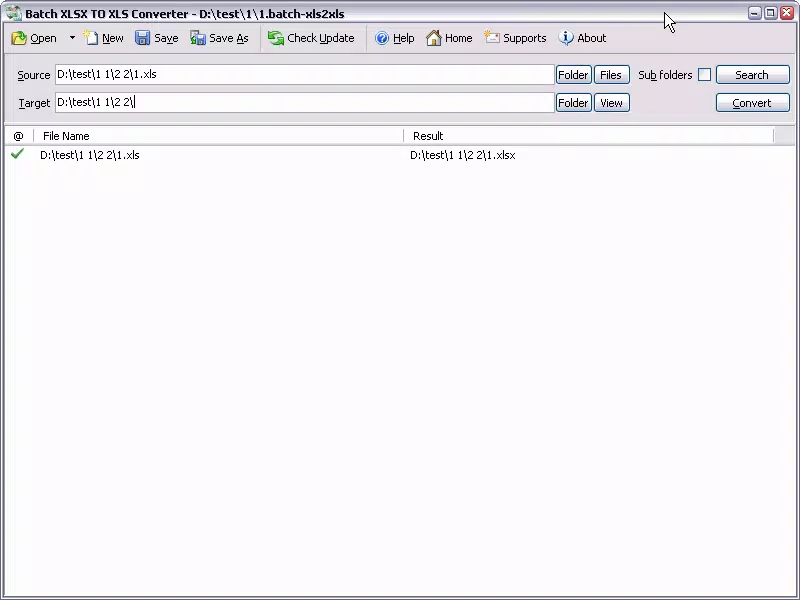
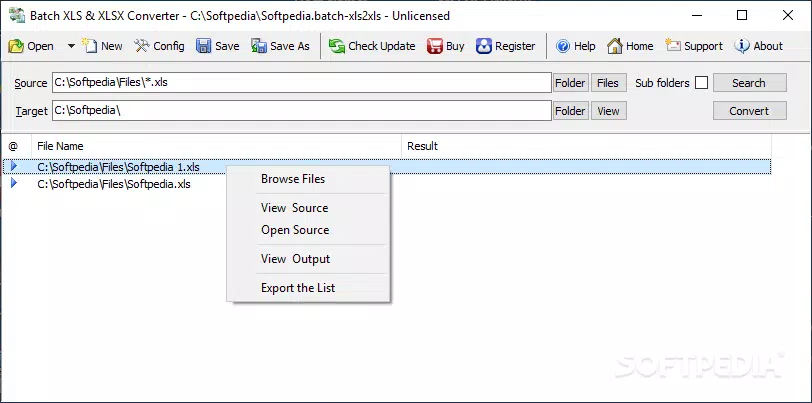
- Streamlined Interface – The application features a clean, minimal layout that avoids clutter. Users can initiate conversions with just a few clicks, making it accessible even to those unfamiliar with file conversion tools. The absence of complex menus or configuration options reduces cognitive load and accelerates task completion.
- Efficient Conversion Process – Batch XLSX to XLS Converter performs automatic format conversion between XLS and XLSX without requiring user intervention. The process is consistent and predictable, eliminating the need to adjust settings for each file. This ensures uniform output quality across all converted files.
- Flexible File Selection – Users can select individual files, multiple files, or entire folders for batch conversion. This flexibility supports diverse workflows, from converting a single report to processing an entire department’s spreadsheet archive. The ability to handle directory-level operations enhances efficiency in large-scale tasks.
- Reliable Data Preservation – The tool maintains the integrity of original data, including cell formatting, formulas, and structure. This ensures that converted files remain functionally equivalent to the source, minimizing the risk of data corruption or loss during the transition.
- Search Engine Feature – A built-in search function helps users locate files that may be misplaced or stored across multiple directories. This feature improves file discoverability and supports seamless workflow continuity, especially when managing large collections of Excel documents.
For example, a financial analyst might use the tool to convert a folder of XLSX reports into XLS format to share with a client using an older version of Excel. The search feature could help locate a missing file within a complex project folder, ensuring no data is overlooked during the conversion process.
Interface, UX & Performance
The user interface of Batch XLSX to XLS Converter is intentionally simple, focusing on core functionality without distractions. The layout emphasizes clarity and ease of navigation, with clearly labeled buttons and a logical flow from file selection to conversion initiation. Visual design elements are minimal, prioritizing usability over aesthetic embellishment.
Navigation is straightforward: users select files or folders, initiate the conversion, and receive confirmation upon completion. The lack of advanced settings reduces the learning curve, making the app suitable for both novice and experienced users. Although the developer did not list formal performance metrics, the application is designed to handle batch operations efficiently, with minimal resource usage.
Responsiveness appears consistent across different device categories, though specific performance benchmarks were not disclosed. Stability during long-running batch processes was not detailed, but the emphasis on data preservation suggests robust handling of file operations. Users can expect a smooth experience during standard conversion tasks, with no reported issues related to crashes or freezes in the available documentation.
Platform Compatibility & Technical Requirements
Batch XLSX to XLS Converter is designed for the Windows platform. The application requires a Windows operating system, though specific version requirements were not listed. The file size is 3.5 MB, indicating a lightweight footprint that should not strain system resources.
While the developer did not specify minimum OS requirements, the small size and single-platform focus suggest compatibility with most modern Windows installations. The application does not appear to require additional runtime libraries or external dependencies, which contributes to its ease of installation and use. No information was provided regarding compatibility with cloud storage integration or remote file access.
Pros and Cons
Pros
- Simple, intuitive interface suitable for users of all skill levels
- Efficient batch conversion without complex settings
- Supports individual files, multiple files, and entire folders
- Preserves data integrity during conversion
- Includes a file search feature for improved file management
Cons
- No customizable conversion settings or output options
- Specific system requirements were not disclosed
- Performance metrics or speed benchmarks were not provided
- Available only for Windows, limiting cross-platform use
- Limited to XLS and XLSX format conversion
FAQ
Is Batch XLSX to XLS Converter secure to download and use?
The application is developed by SoftPas and distributed through official channels. It does not require administrative privileges or access to sensitive system data, making it a low-risk tool for users seeking a simple conversion utility.
Can I convert files back and forth between XLS and XLSX?
Yes, the tool supports bidirectional conversion. It can convert XLSX files to XLS and vice versa, ensuring compatibility with different versions of Excel software.
Does the app support cloud storage integration?
The developer did not provide information about cloud storage support. The application appears to operate locally on the user’s device.
How do I install Batch XLSX to XLS Converter?
Download the installer file, run it, and follow the on-screen instructions. The process is straightforward and does not require advanced technical knowledge.
Is there a free version available?
While the application offers a seven-day trial, the full version is priced at $19.99. No free version was listed in the provided information.
Final Thoughts
Batch XLSX to XLS Converter delivers a focused, reliable solution for users needing to convert Excel files between XLS and XLSX formats. Its minimalist design, batch processing capability, and data preservation features make it a practical choice for professionals managing large volumes of spreadsheets. While it lacks advanced customization and is limited to Windows, its simplicity and consistency stand out in a crowded market of file conversion tools.
Those who frequently work with legacy Excel files or need to maintain compatibility across different software versions will benefit most from this utility. Its value lies in reducing manual effort and ensuring accurate, consistent conversions without unnecessary complexity.
Download Batch XLSX to XLS Converter now


